http://sysadminday.com/
The last Friday of July is the unofficial 'Sys Admin Day'. Go find the folks that ensure your servers stay running and give them a huge THANKS!
If that's you, keeping those systems up. I Thank You!
Friday, July 29, 2011

Thursday, July 28, 2011
Using Pairwise Testing to Minimize Testing and Maintain High Feature Coverage
Problem
You may run across a situation where there are so many combinations of settings to test, it's virtually impossible to test every combination in the time available. Let's consider an example.
Suppose you are testing a product that has printing capabilities and you want to validate that the printing functionality works. You support multiple printers on multiple operating systems using multiple web browsers. In our ficticous product, let's use the following supported components:
Operating Systems
- Windows 7
- Windows Vista
- Windows XP SP 3
- Mac OSX 10.5 (Leopard)
- Mac OSX 10.6 (Snow Leopard)
- Mac OSX 10.7 (Lion)
- Ubuntu 11.0.4
Browsers
- Opera (latest)
- Firefox (latest)
- Safari (latest)
- Chrome (latest)
- IE 7
- IE 8
Printers (you have selected these to work on the supported OS versions)
- HP Inkjet
- HP Laser
- Epson Inkjet
- Epson Laser
- Lexmark Inkjet
- Lexmark Laser
- Canon Inkjet
- Canon Laser
- PDF (file)
User Role (Not testing has caused problems in the past and needs to be added)
- User
- Manager
- Administrator
To test every configuration that would be 7 OS versions x 6 browser versions x 9 printers x 3 roles = 1134 individual combinations. You may notice that IE won't work on non-Microsoft OS, but we'll discuss that in a bit.
Solution
That just won't do. That could be weeks of testing. Let's use the 'allpairs' tool , you could use anything from http://www.pairwise.org/ . I created an input file that listed each component type as columns and it identified 66 test cases that provide good coverage of the supported configurations.
Here is how my input file looked.
If you enter your data in a spreadsheet, copy the data and paste into notepad, it will be in a format that allparis likes. Other tools will have different input methods and the results will be the same.
The output is another tab-delimited file and if you paste the results into excel, you'll see the specific tests.
With this 94% reduction in the number of tests, you can expect to find the vast majority of defects.
Theory
From the pairwise.org site:
If you look at the far-right column of the output table, you'll see a 'pairings' count. This count identifies how many unique pairings of configurations exist in that test. At the top of the list, there are 6 and 6 unique pairings. At the bottom of the list are only single pairings. You can use this information to reduce the number of tests even further. By eliminating tests that have few pairings, you lessen the impact on the overall testing coverage.
There are tools listed that will use more than two factors to limit tests and these can be used when there are lots of columns in your tables. So instead of finding pairs of configurations, you would be finding triples or quadruples of configurations. This increases the likelihood of finding defects, but you will have to contend with 'The Law of Dimishing Returns' in that you'll have to run lots more tests for smaller gains in coverage.
You may run across a situation where there are so many combinations of settings to test, it's virtually impossible to test every combination in the time available. Let's consider an example.
Suppose you are testing a product that has printing capabilities and you want to validate that the printing functionality works. You support multiple printers on multiple operating systems using multiple web browsers. In our ficticous product, let's use the following supported components:
Operating Systems
- Windows 7
- Windows Vista
- Windows XP SP 3
- Mac OSX 10.5 (Leopard)
- Mac OSX 10.6 (Snow Leopard)
- Mac OSX 10.7 (Lion)
- Ubuntu 11.0.4
Browsers
- Opera (latest)
- Firefox (latest)
- Safari (latest)
- Chrome (latest)
- IE 7
- IE 8
Printers (you have selected these to work on the supported OS versions)
- HP Inkjet
- HP Laser
- Epson Inkjet
- Epson Laser
- Lexmark Inkjet
- Lexmark Laser
- Canon Inkjet
- Canon Laser
- PDF (file)
User Role (Not testing has caused problems in the past and needs to be added)
- User
- Manager
- Administrator
To test every configuration that would be 7 OS versions x 6 browser versions x 9 printers x 3 roles = 1134 individual combinations. You may notice that IE won't work on non-Microsoft OS, but we'll discuss that in a bit.
Solution
That just won't do. That could be weeks of testing. Let's use the 'allpairs' tool , you could use anything from http://www.pairwise.org/ . I created an input file that listed each component type as columns and it identified 66 test cases that provide good coverage of the supported configurations.
Here is how my input file looked.
OS browser printer role
Windows 7 Opera (latest) HP Inkjet User
Windows Vista Firefox (latest) HP Laser Manager
Windows XP SP 3 Safari (latest) Epson Inkjet Administrator
Mac OSX 10.5(Leopard) Chrome (latest) Epson Laser
Mac OSX 10.6(Snow Leopard) IE 7 Lexmark Inkjet
Mac OSX 10.7 (Lion) IE 8 Lexmark Laser
Ubuntu 11.0.4 Canon Inkjet
  Canon Laser
  PDF (file)
If you enter your data in a spreadsheet, copy the data and paste into notepad, it will be in a format that allparis likes. Other tools will have different input methods and the results will be the same.
The output is another tab-delimited file and if you paste the results into excel, you'll see the specific tests.
case OS browser printer role pairings
1 Windows 7 Opera (latest) HP Inkjet User 6
2 Windows Vista Firefox (latest) HP Inkjet Manager 6
3 Windows XP SP 3 Safari (latest) HP Inkjet Administrator 6
4 Windows 7 Firefox (latest) HP Laser Administrator 6
5 Windows Vista Opera (latest) HP Laser User 5
…
63 Windows XP SP 3 ~Chrome (latest) Lexmark Laser ~Manager 1
64 Mac OSX 10.7 (Lion) ~Opera (latest) Canon Inkjet ~Manager 1
65 Mac OSX 10.7 (Lion) ~Firefox (latest) Canon Laser ~Administrator 1
66 Ubuntu 11.0.4 ~Opera (latest) PDF (file) ~Administrator 1
With this 94% reduction in the number of tests, you can expect to find the vast majority of defects.
Theory
From the pairwise.org site:
Pairwise (a.k.a. all-pairs) testing is an effective test case generation technique that is based on the observation that most faults are caused by interactions of at most two factors. Pairwise-generated test suites cover all combinations of two therefore are much smaller than exhaustive ones yet still very effective in finding defects.
If you look at the far-right column of the output table, you'll see a 'pairings' count. This count identifies how many unique pairings of configurations exist in that test. At the top of the list, there are 6 and 6 unique pairings. At the bottom of the list are only single pairings. You can use this information to reduce the number of tests even further. By eliminating tests that have few pairings, you lessen the impact on the overall testing coverage.
There are tools listed that will use more than two factors to limit tests and these can be used when there are lots of columns in your tables. So instead of finding pairs of configurations, you would be finding triples or quadruples of configurations. This increases the likelihood of finding defects, but you will have to contend with 'The Law of Dimishing Returns' in that you'll have to run lots more tests for smaller gains in coverage.
Tuesday, July 26, 2011
A Smart Battery That Was Too Smart
Recently, a security researcher found that apple's Smart Battery firmware could be compromised to infect the laptop it was used in. Yikes!
http://arstechnica.com/apple/news/2011/07/how-charlie-miller-discovered-the-apple-battery-hackhow-a-security-researcher-discovered-the-apple-battery-hack.ars
http://arstechnica.com/apple/news/2011/07/how-charlie-miller-discovered-the-apple-battery-hackhow-a-security-researcher-discovered-the-apple-battery-hack.ars
Monday, July 25, 2011
Bugs!

(image from http://www.clker.com/)
I'm not sure if this qualifies as an allegory or not, but here goes...
(Disclaimer: If you are concerned about the killing of bugs, please do not read further)
I came to work this morning to find a half dozen small ants at my desk. I had heard others having the same issue, but they were several desks away.
My first idea was to mash them. I quickly learned that this was pretty ineffective. I then spot-checked desks nearby. A desk on one side had as many (or more) than I did, but nobody else in our immediate vicinity did.
I decided that I needed to get something that would be more effective. Arriving at the store, I went to the home pesticide area. There were lots of pesticides, including about a dozen that would work on the ants.
Fortunately, there was someone who worked there that pointed out a couple products.
"This trap didn't work because they just wouldn't go in"
"I used this other one and it's been two years and they haven't been back"
Sold!
I considered other options while I was there. There were several types of traps that would attract the ants and then keep them from escaping. There were several products that would kill them outright and others that would feed them poison to take back to the colony to kill them and the colony. I stuck with the colony-killing product that was recommended and came back to work.
There were instructions, but I didn't use them :P . I put the poison in several places. As the ants kept coming, I squashed them. Over the course of the day, the ants at both desks dropped dramatically.
The only question remaining is what will my desk look like in the morning? Would they have scattered during the day anyway?
Thursday, July 21, 2011

Monday, July 18, 2011
Stuxnet
Thanks to my friend Frank, I was able to get to read up in Wired on how Stuxnet was reverse-engineered and what was found when they did so.
Be ready to spend some time reading, it's not short, but it's engaging the whole way.
Wednesday, July 13, 2011
Today in Computing History - July 13 - The Smart Ship That Went Dumb
https://sites.google.com/site/todayincomputinghistory/google-gadget
"In an attempt to promote the stability and utility of the Windows NT platform, a new 'Smart Ship' was fitted with a Windows NT-based network. When one of the systems crashes, a domino-effect takes down all critical systems, leaving the ship unable to move for about an hour."
This is one of the events that I added to my 'Today in Computing History' project. Have fun!
"In an attempt to promote the stability and utility of the Windows NT platform, a new 'Smart Ship' was fitted with a Windows NT-based network. When one of the systems crashes, a domino-effect takes down all critical systems, leaving the ship unable to move for about an hour."
This is one of the events that I added to my 'Today in Computing History' project. Have fun!
Security Links
First, let's start with something fun. This link is to a t-shirt design that shows bad code, why it's bad and what can happen if someone mis-uses it http://cwe.mitre.org/community/tshirt.html
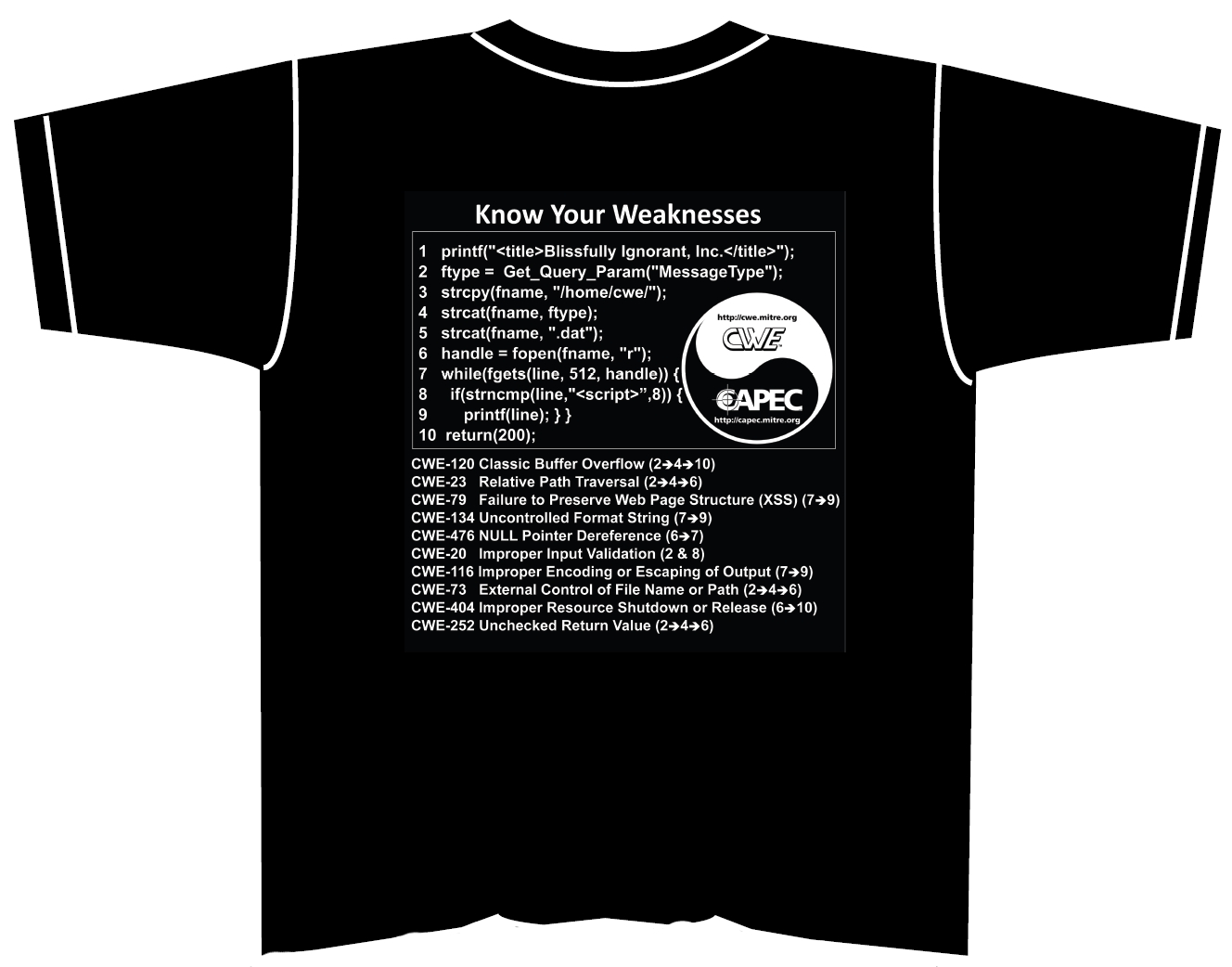
Next, in order to make security testing / mitigation a priority, there needs to be some way to measure it. Here is a link to a group that is working on this http://measurablesecurity.mitre.org/ One standard that is currently used is CVSS http://www.first.org/cvss/cvss-guide.pdf
NIST (National Institute of Standards and Technology) and You
There are so many documents NIST has created that they need a document to list all the documents!http://csrc.nist.gov/publications/CSD_DocsGuide.pdf This list includes the "Technical Guide to Information Security Testing and Assessment" http://csrc.nist.gov/publications/nistpubs/800-115/SP800-115.pdf
There's even a database of various checklists at http://checklists.nist.gov/ One example is, .NET security configuraiton checklists http://web.nvd.nist.gov/view/ncp/repository/checklistDetail?id=7
All of this information stems from looking at a tool called Retina, from eEye.
This tool allows you to scan computers on the network to look for known vulnerabilities. The scans and results provided are best interpreted in light of the links above.
All of this information stems from looking at a tool called Retina, from eEye.
This tool allows you to scan computers on the network to look for known vulnerabilities. The scans and results provided are best interpreted in light of the links above.
Enjoy!
Wednesday, July 06, 2011
Trusted Identities
As part of my development as a Software Quality Assurance tester, I've been building my skills in the Software Security arena. I ran across this US national strategy initiative on Trusted Identities.
Consider a world where you can apply for a mortgage and sign for it digitally and use that same infrastructure to anonymously connect to a private online discussion. There are lots of problems yet to solve in regards to this infrastructure, but here are some useful links to look into this further.
http://www.nist.gov/nstic/NSTIC-Why-We-Need-It.pdf
http://www.nist.gov/nstic/
Consider a world where you can apply for a mortgage and sign for it digitally and use that same infrastructure to anonymously connect to a private online discussion. There are lots of problems yet to solve in regards to this infrastructure, but here are some useful links to look into this further.
http://www.nist.gov/nstic/NSTIC-Why-We-Need-It.pdf
http://www.nist.gov/nstic/
Thursday, June 09, 2011
Job Posting - Sharepoint Admin, Oklahoma City
If you know of someone with Sharepoint experience, please send them Todd's way. You'll find his contact information at the bottom.
============================================
Sr. SharePoint Administrator - Oklahoma City, OK
Primary Duties & Responsibilities:
•Serve as Administrator for SharePoint 2007, SharePoint 2010
•Serve as Administrator for FAST for SharePoint 2010
•Plan and lead application system installations and upgrades.
•Monitor, support and diagnose application systems functioning to ensure specifications are met.
•Modify existing application systems to correct errors, allow it to adapt to new hardware, or to improve its performance.
•Develop procedures for application system testing and validation to ensure system integrity.
•Prepare and review appropriate documentation to record computer specifications, layouts and peripheral equipment modifications.
•Design and perform capacity planning processes to ensure performance is in line with business expectations.
•Analyze user needs and design software requirements within time and cost constraints.
•Develop and support business relationships with project team and business customers.
•Develop and implement policies, procedures and standards to ensure conformance with information systems goals and procedures.
•Report status, issues, and timelines to management staff and project teams.
•Lead multi-function teams in problem resolution, evaluation and implementation of solutions.
•Provide mentoring and training to associate systems administrators and system administrators.
•Strong knowledge of enterprise search concepts
•Strong knowledge of web server technologies/frameworks/concepts (HTTP, networking, Windows Server 2008 R2, Active Directory, PowerShell)
•Demonstrated ability to solve complex technical issues, working alone or in a team
•Demonstrated ability to work in a fast-paced, team environment
•Ability to communicate effectively with all levels of co-workers, clients and other external contacts
•Demonstrated ability to document system architecture, installation configuration, methods and procedures for cross training and troubleshooting
•Excellent written and verbal English communication skills
•Experience with Microsoft FAST Search is preferred
•Experience with Microsoft SharePoint is preferred
Education & Work Experience
Minimum Requirements:
•Bachelor's degree in Computer Science or Management Information Systems or equivalent experience.
•Experience generating or adapting equipment and technology to serve user needs.
Minimum of 4 years Systems Administration - SharePoint experience
Contact:
Todd Laduron
Sr. Technical Recruiter - CDI IT Solutions
602-508-6471
Primary Duties & Responsibilities:
•Serve as Administrator for SharePoint 2007, SharePoint 2010
•Serve as Administrator for FAST for SharePoint 2010
•Plan and lead application system installations and upgrades.
•Monitor, support and diagnose application systems functioning to ensure specifications are met.
•Modify existing application systems to correct errors, allow it to adapt to new hardware, or to improve its performance.
•Develop procedures for application system testing and validation to ensure system integrity.
•Prepare and review appropriate documentation to record computer specifications, layouts and peripheral equipment modifications.
•Design and perform capacity planning processes to ensure performance is in line with business expectations.
•Analyze user needs and design software requirements within time and cost constraints.
•Develop and support business relationships with project team and business customers.
•Develop and implement policies, procedures and standards to ensure conformance with information systems goals and procedures.
•Report status, issues, and timelines to management staff and project teams.
•Lead multi-function teams in problem resolution, evaluation and implementation of solutions.
•Provide mentoring and training to associate systems administrators and system administrators.
•Strong knowledge of enterprise search concepts
•Strong knowledge of web server technologies/frameworks/concepts (HTTP, networking, Windows Server 2008 R2, Active Directory, PowerShell)
•Demonstrated ability to solve complex technical issues, working alone or in a team
•Demonstrated ability to work in a fast-paced, team environment
•Ability to communicate effectively with all levels of co-workers, clients and other external contacts
•Demonstrated ability to document system architecture, installation configuration, methods and procedures for cross training and troubleshooting
•Excellent written and verbal English communication skills
•Experience with Microsoft FAST Search is preferred
•Experience with Microsoft SharePoint is preferred
Education & Work Experience
Minimum Requirements:
•Bachelor's degree in Computer Science or Management Information Systems or equivalent experience.
•Experience generating or adapting equipment and technology to serve user needs.
Minimum of 4 years Systems Administration - SharePoint experience
Contact:
Todd Laduron
Sr. Technical Recruiter - CDI IT Solutions
602-508-6471
Wednesday, June 08, 2011
Did you ever...?
Did you ever find a site that you went to start to get slow, buggy or that people just seemed to stop responding to you as if they all agreed to do so at the same time?
It may not be just your imagination or that the site is having issues. You may be flagged as an abusive user and these techniques are intentional ways to convince you to calm down and re-think your approach.
I was reading about the stackoverflow.com site (and related sites) where something needed to be done with the small set of users that were making the site unpleasant for everyone else.
http://www.codinghorror.com/blog/2011/06/suspension-ban-or-hellban.html
But what does this have to do with QA? Well, consider what happens if your site behaves erratically, is slow and error prone. Whether it's intentional or not, it drives users away. Do you know how often this happens? What's the impact when it does? How do you bring this to light?
Just something to consider.
It may not be just your imagination or that the site is having issues. You may be flagged as an abusive user and these techniques are intentional ways to convince you to calm down and re-think your approach.
I was reading about the stackoverflow.com site (and related sites) where something needed to be done with the small set of users that were making the site unpleasant for everyone else.
http://www.codinghorror.com/blog/2011/06/suspension-ban-or-hellban.html
But what does this have to do with QA? Well, consider what happens if your site behaves erratically, is slow and error prone. Whether it's intentional or not, it drives users away. Do you know how often this happens? What's the impact when it does? How do you bring this to light?
Just something to consider.
Friday, June 03, 2011
Incredibly strong passwords that are easy to remember
Steve Gibson is an interesting fellow that has been around quite a while. One thing he does when not creating commercial products is doing security-related research. He has come up with a way to make strong passwords easy to remember.
https://www.grc.com/haystack.htm
Consider these two passwords:
B0P4LzSzVZ4GgWiSZ5z2
.......D1mw!t.......
According to his calculations, it would take a thousand times more time to crack the second password than the first, even though the first is easier to remember! (check it out for yourself by going to the link above) The idea is that if you take what we typically use for a secure, but memorable password, and padd the front and back with something, anything easy to remember.
For example, take H3!!0 and make it something like one of these:
...H3!!0........
[]H3!!0[][][][]
~~~~H3!!0~
***H3!!0****
<-><->H3!!0<-><->
This increases the length of the password and minimally increases the ability to memorize it.
Wednesday, June 01, 2011
Job Posting - Norman, OK
If you are in the Norman area and considering opportunities in Quality Assurance, here is one through Tek Systems. They have supported this group for several years and I am very appreciative of that support.
The contact information is at the bottom of the description, please feel free to contact Chris if you are interested.
-----------------------------------
The Quality Assurance Analyst is responsible for conducting quality control activities for the IT Services Department. The QA Analyst will analyze application systems, create test case documentation, and execute plans. The successful candidate will have proven experience ensuring that complex software applications are performing as designed. Running queries in SQL. Score well on SQL assessment. Needs to proficient and score 5-6 on a scale to 10. Open up SQL scripts and understand it, do joins, deletes, updates, executes in outer joins, unions. Have SQL Fundamentals.
• Develop and maintain test plans, manual and automated test scripts for user interface, functionality, system and "ad-hoc testing".
• Execute regression tests, functional tests and data tests.
• Document quality assurance practices.
• Provide analysis of test results and deliver solutions to problem areas.
• Ensure that testing activities will allow applications to meet business requirements and systems goals, fulfill end-user requirements, and identify and resolve systems issues.
• Ensure that any new software integration into company systems meets functional requirements, system compliance, and interface specifications.
• Create and execute test scripts, cases, and scenarios that will determine optimal system performance according to specifications.
• Conduct all types of application testing as needed, such as system, unit, regression, load, and acceptance testing methods.
• Analyze formal test results in order to discover and resolve defects, bugs, errors, configuration issues, and interoperability flaws.
• Analyze documentation and technical specifications of any new application under deployment or consideration to determine its intended functionality.
• Produce reports and documentation for all testing efforts, results, activities, data, logging, and tracking.
• Communicate test progress, test results, and other relevant information.
Chris Keller - Technical Recruiter
3501 NW 63RD suite #300, OKLAHOMA CITY, OK 73116
866.585.0552 T 405.254.1723
F 405.415.1460 M 405.819.1310
World IPV6 Day - June 8, 2011
There have been several tests of IPV6 around the world already and this is no different. Major web sites such as Microsoft and Google will offer thier content over IPV6.
Now that all the IPV4 address have been claimed by Regional Internet Registries, it's just a matter of time before they are all used up. There are still questions as to how the IPV6 switchover will occur, but knowing your way around IPV6 will be a new skill to learn.
Now that all the IPV4 address have been claimed by Regional Internet Registries, it's just a matter of time before they are all used up. There are still questions as to how the IPV6 switchover will occur, but knowing your way around IPV6 will be a new skill to learn.
Thursday, May 26, 2011
Book Review - "Open Source Fuzzing Tools" by Gavi Evron

"Open Source Fuzzing Tools" is written by Gavi Evron and does an excellent job providing a broad range of tools used for fuzzing and their basic usage. There is even a chapter that walks you through building your own file fuzzing tool in perl.
Some specific points that I learned from this book:
- There are (at least) three flavors of fuzzing: 1)File fuzzing- where you create malformed files used by the application. 2) Network fuzzing - network traffic used by the application are malformed and sent and 3) Library fuzzing - calling libraries directly with malformed input.
- The more you know about the workings of the application, the better you can tune your fuzzer to generate malformed data.
- The more you know about assmebler, compilers, bytecode, and TCP/IP, the better. These are the building-blocks for fuzzing.
It's possible to run many of these tools, such as wsfuzzer, without a deep understanding of the application and the underlying technologies, but the more you know, the better you are able to understand the output and take appropriate action.
Some specific points that I learned from this book:
- There are (at least) three flavors of fuzzing: 1)File fuzzing- where you create malformed files used by the application. 2) Network fuzzing - network traffic used by the application are malformed and sent and 3) Library fuzzing - calling libraries directly with malformed input.
- The more you know about the workings of the application, the better you can tune your fuzzer to generate malformed data.
- The more you know about assmebler, compilers, bytecode, and TCP/IP, the better. These are the building-blocks for fuzzing.
It's possible to run many of these tools, such as wsfuzzer, without a deep understanding of the application and the underlying technologies, but the more you know, the better you are able to understand the output and take appropriate action.
Tuesday, May 17, 2011
Tuesday, May 03, 2011
Levels of abstraction, from Order to Chaos and back again
"There is a theory which states that if ever anyone discovers exactly what the Universe is for and why it is here, it will instantly disappear and be replaced by something even more bizarre and inexplicable. There is another theory which states that this has already happened." - Douglas Adams from 'The Hitchiker's Guide to the Galaxy'For years, I've thought about the order and chaos of the Universe as a lens to look at work. There is order in the universe in that there is this one large blob. But it quickly devolves into chaos when you see each of the galaxies. But looking at our galaxy, there is a sense of order in the spiral arms that make it up and the line of stars in the night sky that we see. This devolves again into chaos as we see the scattering of star systems within the galaxy. But order shows itself again in the orbits of the planets around the sun and the seemingly-perfect spheres that the planets and moons make. But a closer look reveals the chaos of the surface of the planet with mountains and valleys. We can continue this journey to the infinitesimile, but you should get the idea by now :)
Now think about working in a company. The company has a simple goal of making a profit. Then there is the chaos of how the organization is split up But in business unit, there are often annual goals which are very specific. These are to be met by a variety of teams that must figure out a plan to meet these goals, which you as an individual have specific annual goals. However, on a day-do-day basis, your time is spent doing many things, only some of which is towards the annual goals directly.
If you are still reading, congratulations! (and thanks for bearing with me while I try to get to the point) So, where do you like spending your time, in the chaos or the order? Where do your peers like spending time? In which location does your company's culture want you to spend your time?
Just something to ponder...
Book Review - "Threat Modeling" by Frank Swiderski and Window Snyder

Even though this book is from 2004, the method it describes for approaching security testing is sound. The basic method is:
- Create a Threat Profile
- Idendity Targets
- Identify Entry/Exit Points
- Build Models based on this data
- Associate Risks with each Target
- Determine how these risks will be tested
- Perform tests and report results
- Repeat
This book is an easy read and there is little technical knowledge that is required to be able to understand the concepts presented, which allows it to be technology-agnostic. However, you will need a bit more technical skill to be able to perform some of the analysis and testing that is described. The examples are helpful and provide a good guide on how do document the models.
I would recommend this book to anyone that is responsible for building, testing or responsible for the security of an application.
Monday, April 18, 2011
FTP is 40 years old this week
The idea of transferring files between computers has been around since networking began, but this protocol is the one that has survived the longest.
Thursday, April 14, 2011
Have Fun Learing!
Did you ever want to spend team time to learn a new skill or hone an existing one? Here is a site that lists lots of games to play that are centered on software development teams. http://tastycupcakes.org/ Enjoy!
Subscribe to:
Posts (Atom)